The year’s calendar
Every awareness day and Islamic date ahead, each linked to its bundle, so you are ready weeks before you need it.

The calendar of key dates with every bundle ready, the full resource library and Aani Certified CPD, on your phone, tablet or computer. Free with your plan, with nothing to download from an app store.
Free with your plan · installs from your browser in under a minute · iPhone, iPad, Android, Mac, Windows and Chromebook
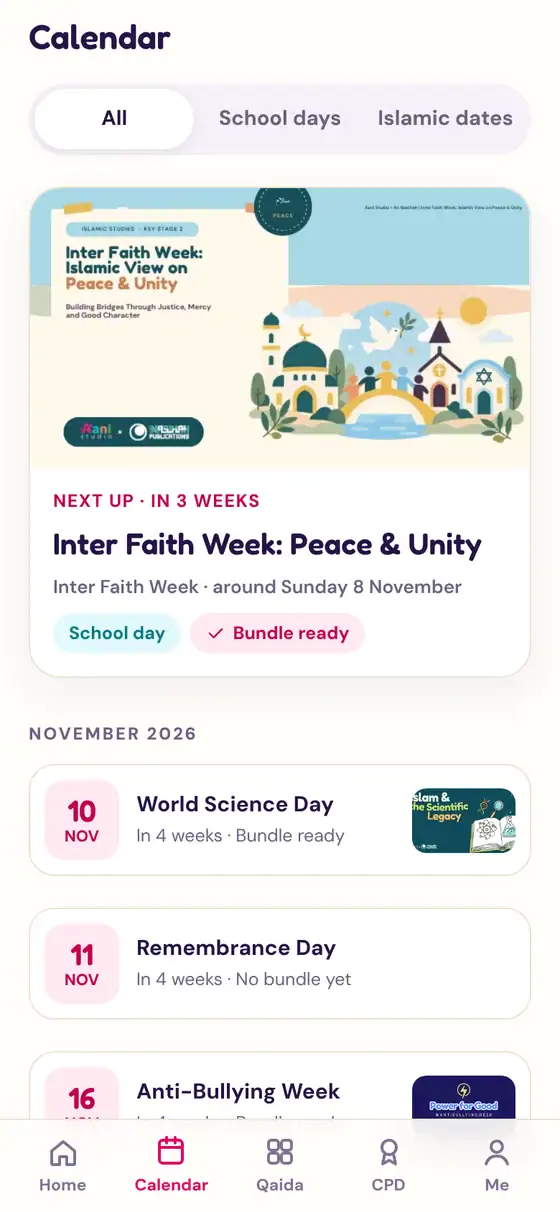
Every awareness day and Islamic date ahead, each linked to its bundle, so you are ready weeks before you need it.
Open any pack and put the slides up full screen. Worksheets, answer sheets and teacher guidelines are a tap away.
The same game as the website, full screen, so children can practise their Arabic reading at home.
Pick up an Aani Certified course right where you left off, and collect your certificate.
On a school login, each teacher chooses their name and PIN, so their CPD and progress stay their own.
Suggest a topic or vote for the next pack from wherever you are.
We’ve picked yours for you. You only do this once.
 Aani StudioAani StudioAani Studio
Using a Samsung phone? In Samsung Internet, tap the menu, then Add page to and Home screen.
Add to DockAani StudioInstall app?Aani Studio · aanistudio.comNo. It comes with your Individual or School & Madrassah plan, using the same login as the website.
Aani installs straight from the website as a web app. It works on iPhone, iPad, Android, Mac, Windows and Chromebook, and updates itself.
Yes, for Qaida Quest. There are no adverts and no chat. A grown-up lock and a daily time limit are coming soon.
Yes, once, with the same email and password as the website. The app then keeps you signed in for 30 days at a time.
Yes. Tap “New to Aani?”, choose your plan and pay securely with Stripe. It’s the same plans and prices as the website.
Make sure you are in Safari, then scroll further down the Share menu. You can also tap Edit Actions to add it to the list.
Press and hold the icon and choose Remove App (iPhone and iPad) or Uninstall (Android, Mac and Windows). Your account is not affected.
Stuck? WhatsApp us on 07900 323014 and we’ll talk you through it.